
Built for Streamelements
Twitch Chat Widgets
Custom chat overlays for your stream. Animated designs, easy StreamElements setup — paste one URL into OBS and your chat looks amazing in minutes.
Custom Chat Overlays for Twitch & YouTube
Hand-crafted chat overlays that transform how your stream chat looks. Each widget features unique animations, custom typography, and styled message bubbles — all running through StreamElements. Pick a design that matches your stream, paste one URL into OBS or Streamlabs, and your chat looks professional in minutes.

Cute Chat Widget

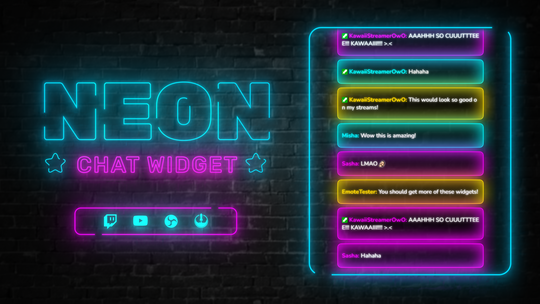
Neon Chat Widget

Messenger Chat Widget

Hacker Terminal Chat Widget

Cute Lofi Chat Widget

Glass Chat Widget

Moon Chat Widget

Cosmic Chat Widget

Retro Lofi Chat Widget

Minimal Gradient Chat Widget

Cute Pink Chat Widget

Cute Hearts Chat Widget

Horizontal Cute Kawaii Chat Widget

Night Sky Chat Widget

Halloween Chat Widget

Christmas Chat Widget

New Chatter Welcome Widget
Default Chat vs. Custom Chat Widget
See the difference a styled chat overlay makes on your stream
Default
StreamElements Default Chat
Plain text messages with basic usernames, system fonts, and no visual styling. Every streamer using the default looks identical — no personality, no brand recognition.
Custom
kudos.tv Chat Widget
Custom fonts, animated message entrances, styled bubbles, themed badge displays, and color-matched design. Your chat becomes a visual element of your stream — instantly recognizable and professional.
| Feature | Default SE Chat | kudos.tv Widgets |
|---|---|---|
| Visual themes | Plain text, no personality | 17+ unique designs — anime, neon, retro, minimal |
| Message animations | Basic fade only | Bounce, slide, float — per-theme custom animations |
| Typography | System fonts | Premium fonts hand-picked per theme |
| Message styling | Plain text boxes | Glassmorphism, gradients, neon glow, themed frames |
| Badge display | Basic badges | Custom badge styling that matches the theme |
| Stream branding | Looks like every other stream | Matches your aesthetic — stands out immediately |
| Setup | Manual CSS editing required | One-click import — paste URL and go |
What Makes Our Chat Widgets Different
Unique Designs
Hand-crafted chat overlays that match your stream aesthetic — anime, minimal, retro, neon, and more. No generic templates.
One-URL Setup
Every widget runs through StreamElements. Copy one browser source URL into OBS or Streamlabs — your styled chat is live instantly.
Fully Customizable
Change fonts, colors, badge visibility, message spacing, and animation style directly in the StreamElements dashboard. No code needed.
What You Can Customize
Every setting adjustable through the StreamElements dashboard — no code required
Message Animations
Each widget ships with a signature animation — bounce, slide, float, or fade. Messages enter the chat with visual flair that matches the theme's personality.
Premium Typography
Hand-picked fonts per theme, optimized for readability at stream resolution. No more generic sans-serif — your chat text has character.
Badge Styling
Sub, mod, and VIP badges display with styling that matches the widget theme. Toggle badge visibility on or off through the StreamElements dashboard.
Background & Opacity
Transparent, semi-transparent, or solid backgrounds — adjust opacity to blend with your overlay or let gameplay show through. Change it anytime in settings.
Message Spacing & Fade
Control how long messages stay visible before fading out and how they stack. Keep your chat readable without clutter, even during high-activity moments.
Color Coding
Username colors, message backgrounds, and accent highlights are all customizable. Match your stream's color palette or use the theme's default scheme.
Full Emote Support
BTTV, FFZ, and 7TV emotes render natively — including animated emotes. Your community's favorite emotes display exactly as intended.
Vertical or Horizontal
Standard vertical chat for most layouts, or horizontal chat for wide scenes and Just Chatting setups. Both orientations available across widget designs.
Works With Your Setup
Compatible with all major streaming software and platforms


How to Set Up a Chat Widget
Works with OBS Studio, Streamlabs, and any browser-source-compatible software
-
Download Your Chat Widget
After purchase, download the ZIP file from your order confirmation. Inside you'll find a setup guide with your unique StreamElements widget URL. -
Install to StreamElements
Log into your StreamElements account, open the overlay editor, and install the widget using the included instructions. The chat design loads automatically with all animations and styling pre-configured. -
Customize the Look
Use the StreamElements dashboard to fine-tune your chat widget. Adjust fonts, colors, badge visibility, message animation, background opacity, and more — all changes update live in your preview. -
Add to Your Streaming Software
Copy the overlay URL from StreamElements. In OBS Studio or Streamlabs, add a Browser Source, paste the URL, and set the resolution to 1920×1080. Your styled chat appears on stream immediately.
Why Custom Chat Widgets Matter
The practical case for upgrading from default chat
10 sec
First impressions are instant
Viewers evaluate stream quality within seconds of landing. A styled chat overlay signals production effort — the same quality cue as professional overlays, good audio, and proper lighting. Cohesive visual branding keeps new viewers watching instead of clicking away.
100%
Chat is always on screen
Unlike alerts that fire occasionally, your chat widget is visible the entire time you're live. It's the single most persistent visual element after your overlay itself — making it the highest-impact design upgrade per dollar you can make.
$3–6
One-time, not monthly
Premium chat widgets start at $3–6 with no recurring fees. StreamElements hosting is free. Compare that to subscription overlay tools at $10–20/month — a one-time widget purchase pays for itself on day one and works indefinitely.


Frequently Asked Questions
What is a Twitch chat widget?
A Twitch chat widget is a custom chat overlay that displays your stream chat with a unique visual design — custom fonts, colors, animations, and layout. Unlike the default Twitch chat, chat widgets let you style how messages appear on your stream to match your brand and aesthetic.
How do I add a chat widget to OBS?
Copy your chat widget's browser source URL from the StreamElements dashboard. In OBS Studio, click the + button under Sources, select Browser Source, paste the URL, and set the resolution to 1920×1080. Your styled chat will appear on stream instantly.
Do chat widgets work with Streamlabs?
Yes. Our chat widgets work with Streamlabs and any streaming software that supports browser sources. In Streamlabs Desktop, add a Browser Source, paste your StreamElements overlay URL, and your custom chat is ready.
Can I customize the chat widget after buying?
Absolutely. Every chat widget is fully customizable through the StreamElements dashboard. You can change fonts, text colors, background opacity, badge visibility, message animation style, shadow effects, and spacing — all without editing any code. Changes update live in your preview.
Do these support BTTV, FFZ, and 7TV emotes?
Yes. All chat widgets render BTTV, FrankerFaceZ (FFZ), and 7TV emotes natively — including animated emotes. Your community's custom emotes display exactly as they appear in the Twitch chat panel, with full animation support.
What browser source dimensions should I use?
Set your browser source to 1920×1080 in OBS or Streamlabs. This matches your stream's output resolution and ensures the chat widget scales correctly. The widget itself occupies a portion of the overlay — you can reposition and resize the source layer within your streaming software to fit your layout.
Will this affect my stream performance?
No. Chat widgets run as a browser source, which uses minimal CPU and RAM. StreamElements processes the rendering server-side, so the performance impact on your streaming PC is negligible — comparable to having one extra browser tab open.
Do sub, mod, and VIP badges show in the widget?
Yes. All Twitch badges (subscriber, moderator, VIP, broadcaster, Turbo, etc.) display in the chat widget. You can toggle badge visibility on or off through the StreamElements dashboard, and badges are styled to match each widget's theme.
Are there free chat widgets?
StreamElements includes a basic default chat widget for free. For custom-designed chat widgets with unique animations and styling, check our Freebies section or browse the full collection above. Premium widgets start at just a few dollars.
Do these work on YouTube streams?
Yes. StreamElements supports both Twitch and YouTube. Connect your YouTube channel in the StreamElements dashboard and the same chat widget URL will display your YouTube live chat with the same custom styling.
What's the difference between a chat widget and a chat overlay?
They're the same thing — different names for a custom-styled chat display on your stream. 'Chat widget' usually refers to the StreamElements implementation (browser-source URL), while 'chat overlay' can also mean a static image frame placed around the default chat. Our products are interactive widgets that style your actual live chat messages. Browse all twitch overlays for complete stream packages that include chat widgets, alerts, and more.
Upgrade Your Stream Chat
Our most popular chat widget designs


Level up your stream chat
Custom chat widgets from $3. One-URL setup, works with OBS and Streamlabs.
Paste this code at checkout to apply
Your chat deserves better
Custom-designed chat widgets that match your stream. Easy StreamElements setup, instant results.
Paste this code at checkout to apply
Works with OBS Studio, Streamlabs & StreamElements