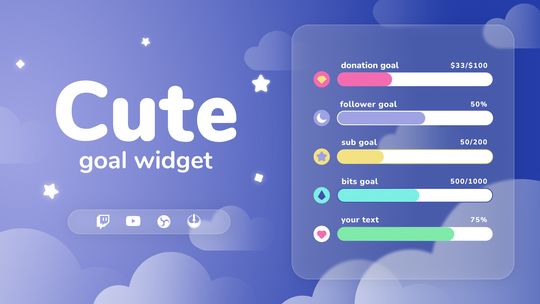
Animated goal bars for subs, donations, and followers. Custom designs that work with StreamElements — paste one URL into OBS and your goal bar looks incredible in minutes.
Custom Goal Bars for Twitch & YouTube
Animated goal widgets that turn your sub, donation, and follower milestones into visual moments on stream. Each design features unique fill animations, custom typography, and themed styling — all running through StreamElements. Pick a design, paste one URL into OBS or Streamlabs, and your goal bar is live.
See the difference a designed goal bar makes on your stream
Default
StreamElements Default Goal Bar
A plain progress bar with basic text — no personality, no animation, no visual connection to the rest of your stream. Every streamer using the default looks identical.
Custom
kudos.tv Goal Widget
Themed designs with animated fill effects, custom fonts, and styled containers that match your overlay aesthetic. Your goal bar becomes part of the visual experience — not just a progress indicator.
Animated fills with glow, pulse, and shimmer effects
Typography
System fonts
Premium fonts hand-picked per theme
Goal types
Subs, followers, tips
Subs, followers, tips — same types, better presentation
Stream branding
Looks like every other stream
Matches your overlay aesthetic — immediately recognizable
Customization
Basic color picker only
Colors, fonts, border radius, opacity, labels — all adjustable
Setup
Built-in, limited styling
One-click import — paste URL and go
What Makes Our Goal Widgets Different
Unique Designs
Hand-crafted goal bars that match your stream aesthetic — pixel art, kawaii, fantasy, retro, and more. Not a recolored rectangle.
One-URL Setup
Every goal widget runs through StreamElements. Copy one browser source URL into OBS or Streamlabs — your styled goal bar is live instantly.
Fully Customizable
Change colors, fonts, labels, bar thickness, border radius, and opacity directly in the StreamElements dashboard. No code needed.
What You Can Customize
Every setting adjustable through the StreamElements dashboard — no code required
Animated Fill Effects
Each widget ships with a signature fill animation — shimmer, glow, pulse, or smooth gradient transitions. As progress increases, the bar fills with visual flair that matches the theme.
Sub, Donation & Follower Goals
Track any StreamElements-supported goal type — subscriber counts, tip totals, follower milestones, or custom numerical goals. Switch goal types without changing your widget.
Premium Typography
Hand-picked fonts per theme, optimized for readability at stream resolution. Goal labels and progress numbers look sharp and match the widget's personality.
Color Customization
Bar fill color, background color, text color, and accent highlights are all adjustable. Match your stream's color palette or use the theme's default scheme.
Custom Labels & Text
Change the goal title, progress format, and completion message. Show "42 / 100 subs" or "$142 raised" — whatever fits your milestone.
Background & Opacity
Transparent, semi-transparent, or solid backgrounds. Adjust opacity to blend seamlessly with your overlay or let gameplay show through.
Size & Position
Resize the goal bar to any width and height within your OBS scene. Compact for a corner placement, or stretch it across the bottom of your stream.
Real-Time Updates
Goal progress updates live as subs, donations, and follows come in. The fill animation triggers on every increment — your viewers see progress happen in real time.
Works With Your Setup
Compatible with all major streaming software and platforms
OBS StudioBrowser source
Streamlabs DesktopBrowser source
TwitchFull support
YouTubeFull support
StreamElementsRequired (free)
How to Set Up a Goal Widget
Works with OBS Studio, Streamlabs, and any browser-source-compatible software
1
Download Your Goal Widget
After purchase, download the ZIP file from your order confirmation. Inside you'll find a setup guide with your unique StreamElements widget URL.
2
Install to StreamElements
Log into your StreamElements account, open the overlay editor, and install the widget using the included instructions. The goal bar loads automatically with all animations and styling pre-configured.
3
Set Your Goal
Choose your goal type — subscriber count, donation total, or follower milestone. Set the target number, customize the label text, and adjust colors and fonts through the StreamElements dashboard. All changes update live in your preview.
4
Add to Your Streaming Software
Copy the overlay URL from StreamElements. In OBS Studio or Streamlabs, add a Browser Source, paste the URL, and set the resolution to 1920×1080. Your styled goal bar appears on stream immediately.
Why Custom Goal Widgets Matter
The practical case for upgrading from the default goal bar
Momentum
Visible progress drives action
When viewers see a goal bar filling up in real time, it creates a shared sense of progress. That visual momentum turns passive watchers into active participants — people want to be part of pushing the bar to completion.
Always on
A constant reminder to contribute
Unlike alerts that flash and disappear, a goal bar sits on screen for the entire stream. It's a persistent, low-pressure call to action that works without you having to ask your chat for subs or donations.
$3–5
One-time, not monthly
Premium goal widgets start at a few dollars with no recurring fees. StreamElements hosting is free. Compare that to subscription overlay tools at $10–20/month — a one-time purchase that works indefinitely.
Goal Widgets for Every Milestone
Track subs, donations, followers, or anything else you're working toward
Sub Goals
Subscriber Milestones
Track your path to affiliate, partner, or community milestones. A visible sub goal motivates viewers to subscribe — especially during events and subathons where every sub moves the bar.
Donations
Tip & Donation Goals
Fundraising for new gear, a charity stream, or a community reward? A donation goal bar shows real-time progress and gives every contribution visible impact — even small tips feel meaningful when they move the bar.
Followers
Follower Milestones
Celebrate community growth with follower count goals. Great for new streamers building toward affiliate requirements or established channels pushing toward round-number milestones.
Subathon
Subathon & Events
Subathons live and die by visual momentum. A themed goal bar keeps the energy high as subs roll in — viewers can see exactly how close they are to the next milestone, which drives participation during long events.
A goal widget is a visual progress bar that displays on your stream to track milestones — subscriber counts, donation totals, follower targets, or any custom goal. As viewers contribute, the bar fills up in real time with animated effects. It's one of the most effective ways to encourage participation during a stream.
What types of goals can I track?
You can track any goal type supported by StreamElements — subscriber count, tip/donation totals, follower milestones, Bit donations, and custom numerical goals. Switch between goal types anytime through the StreamElements dashboard without changing your widget.
How do I add a goal widget to OBS?
Copy your goal widget's browser source URL from the StreamElements dashboard. In OBS Studio, click the + button under Sources, select Browser Source, paste the URL, and set the resolution to 1920×1080. Your styled goal bar will appear on stream instantly.
Do goal widgets work with Streamlabs?
Yes. Our goal widgets work with Streamlabs and any streaming software that supports browser sources. Add a Browser Source, paste your StreamElements overlay URL, and your custom goal bar is ready.
Can I customize the goal widget after buying?
Absolutely. Every goal widget is fully customizable through the StreamElements dashboard. Change colors, fonts, bar thickness, border radius, labels, progress format, and background opacity — all without editing any code. Changes update live in your preview.
How do I set up a donation goal widget?
Install the goal widget to your StreamElements overlay, then set the goal type to "Tips" in the widget settings. Enter your donation target amount and customize the label (e.g., "New Mic Fund" or "Charity Goal"). The bar fills automatically as viewers send tips through StreamElements.
Can I use this as a follower goal widget?
Yes. Set the goal type to "Followers" in your StreamElements dashboard and enter your target number. The bar updates in real time as new followers come in — perfect for tracking your path to affiliate (50 followers) or celebrating community growth milestones.
Do these work for subathons?
Yes — goal widgets are one of the most popular subathon tools. Set a subscriber target, and the bar fills live as subs roll in. The visual momentum keeps energy high during long events. We also have a dedicated subathon widget with additional features like timer integration.
Will this affect my stream performance?
No. Goal widgets run as a browser source, which uses minimal CPU and RAM. StreamElements processes the rendering server-side, so the performance impact on your streaming PC is negligible — comparable to having one extra browser tab open.
Do these work on YouTube streams?
Yes. StreamElements supports both Twitch and YouTube. Connect your YouTube channel in the StreamElements dashboard and the same goal widget URL will track your YouTube live stream goals with the same custom styling.
What's the difference between a goal widget and a goal bar?
They're the same thing — different names for a visual progress tracker on your stream. "Goal bar" usually refers to the basic default version, while "goal widget" often means a custom-designed version with animations and themed styling. Our products are interactive widgets that replace the default bar with something that actually matches your stream. Browse all twitch overlays for complete packages that include goal widgets, alerts, and more.