
Tagged with 'RPG'
1 Results

What is a Twitch Sub Badge?

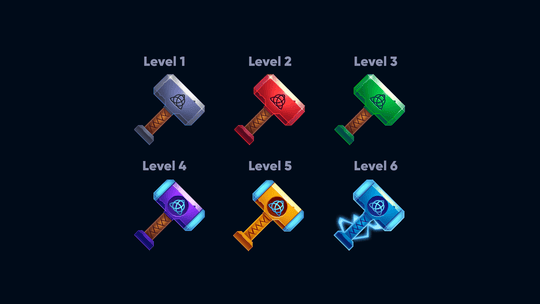
A Twitch sub badge is a small icon displayed next to a subscriber’s name in chat. Each badge tier represents how long a viewer has been subscribed — 1 month, 3 months, 6 months, and so on. Custom sub badges reward loyal subscribers with unique designs and give your channel a professional, branded look.
Our premade sub badge sets include multiple tiers ready to upload to Twitch, YouTube, and Discord. No design work needed — just download and upload. Browse free badges to get started, match your badges with emotes, or explore all twitch overlays to build a unified channel brand.
Our premade sub badge sets include multiple tiers ready to upload to Twitch, YouTube, and Discord. No design work needed — just download and upload. Browse free badges to get started, match your badges with emotes, or explore all twitch overlays to build a unified channel brand.
Frequently Asked Questions
What are Twitch sub badges?
Twitch sub badges are small icons that appear next to a subscriber’s name in chat. Each badge tier represents the length of their subscription — 1 month, 3 months, 6 months, 1 year, and beyond. Custom sub badges replace the default Twitch badges with your own designs, making your channel feel more professional and rewarding your community.
How do I upload sub badges to Twitch?
Go to your Twitch Creator Dashboard, navigate to Viewer Rewards > Sub Badges, and upload an image for each badge tier. Twitch requires badges in three sizes: 18×18, 36×36, and 72×72 pixels. Our badge sets include all three sizes pre-exported for every tier, so you can upload them directly.
How many sub badge tiers do I need?
Twitch supports badge tiers from 1 month up to multiple years. At minimum, you should have badges for 1, 3, 6, 9, and 12 months. Our badge sets include enough designs to cover all standard tiers, with distinct visuals that progress as the subscription length increases.
What is a Founder’s Badge?
A Founder’s Badge is a special Twitch badge given to the first 10 subscribers of an Affiliate channel or the first 25 subscribers of a Partner channel. Founders can choose to display their Founder’s Badge instead of their regular sub badge. Founder’s Badges cannot be customized — they are set by Twitch.
Do your badges work on YouTube and Discord?
Yes. Our badge sets include files compatible with Twitch, YouTube, and Discord. YouTube uses loyalty badges for channel members, and Discord uses role icons. The image files included in each pack are sized and formatted for all three platforms.
What sizes do Twitch sub badges need to be?
Twitch requires sub badges in three sizes: 18×18, 36×36, and 72×72 pixels. Each size is used at different display resolutions. Our badge sets include all three sizes pre-exported and labeled by tier, so you can upload them to Twitch without any resizing.
