


VTuber software turns your webcam movements into avatar animations for live streams and video content. But "VTuber software" isn't a single tool — it's usually a pipeline of two or three programs working together. You need software to create your avatar, software to rig it (add movement data), and software to track your face and animate it live.
This guide covers the best tools at each stage of that pipeline for both 2D and 3D VTubers in 2026, with honest assessments of what each tool does well and where it falls short.
How VTuber Software Works Together
Before diving into individual tools, it helps to understand the workflow. Most VTubers use two or three separate programs in combination:
| Stage | What It Does | 2D Tools | 3D Tools |
|---|---|---|---|
| Create | Design and draw your avatar | Photoshop, Clip Studio Paint, or commission an artist | VRoid Studio, Blender |
| Rig | Add bones, deformers, and movement to the artwork | Live2D Cubism, Inochi2D | Built into VRoid Studio / Unity |
| Track & Animate | Use your webcam to control the avatar live | VTube Studio, PrprLive | VSeeFace, Live3D |
Example 2D pipeline: Draw character art in Clip Studio Paint → rig it in Live2D Cubism → animate it live in VTube Studio.
Example 3D pipeline: Build a model in VRoid Studio → export as VRM → animate it live in VSeeFace.
Some tools handle multiple stages (Live3D does creation, rigging, and tracking for 3D), but most VTubers mix and match. The software categories below are organized by what each tool is primarily used for.
Quick Comparison
| Software | Type | Primary Use | Price | Platforms |
|---|---|---|---|---|
| VTube Studio | 2D | Face tracking & animation | Free (DLC $14.99 removes watermark) | Windows, macOS, iOS, Android |
| Live2D Cubism | 2D | Avatar rigging | Free tier / Pro ~$100/year (indie) | Windows, macOS |
| Inochi2D | 2D | Avatar rigging (open-source) | Free | Windows, macOS, Linux |
| VRoid Studio | 3D | Avatar creation | Free | Windows, macOS (Steam) |
| VSeeFace | 3D | Face tracking & animation | Free | Windows only |
| Live3D | 3D | All-in-one (create, track, stream) | Free tier / $3.90+/month | Windows |
2D VTuber Software
VTube Studio — Best Face Tracking for 2D Avatars
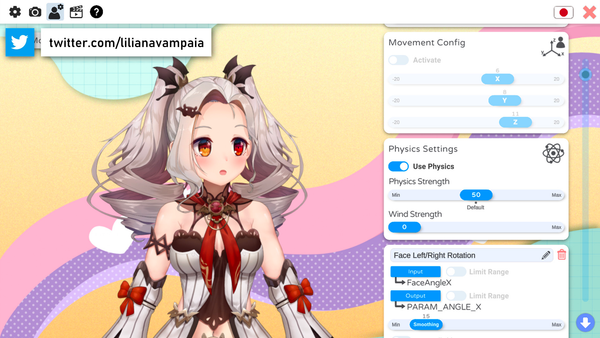
VTube Studio is the standard face-tracking application for 2D VTubers. It takes a rigged Live2D model and uses your webcam (or phone camera) to translate your facial expressions, head movements, and body gestures onto your avatar in real time. If you've watched a 2D VTuber on Twitch or YouTube, they're almost certainly using VTube Studio.
What it does: VTube Studio doesn't create or rig avatars — it animates them. You import a finished Live2D model, and the software handles face tracking, expression hotkeys, animated props, microphone-based lip sync, and scene management. It connects to OBS or Streamlabs as a transparent overlay on your stream.
Key 2025-2026 updates:
- Webcam hand tracking — VTube Studio now tracks hand movements through your webcam without needing a Leap Motion controller. This was one of the most requested features and makes hand gestures accessible to everyone.
- Online multiplayer — Multiple VTubers can appear in the same VTube Studio scene for collabs, eliminating the need for complex OBS setups with multiple capture sources.
- Improved Twitch integration — Viewers can trigger expressions, props, and animations through channel points and bits directly within VTube Studio.
Pricing: Free on Steam with a small watermark. The Pro DLC costs $14.99 (frequently discounted to $7.49 during Steam sales) and removes the watermark permanently. That's it — no subscription.
Platforms: Windows, macOS, iOS, and Android. The mobile versions can be used as wireless face-tracking cameras for the desktop app, which is useful if your webcam quality is poor — iPhone Face ID tracking is significantly more precise than most webcams.
Limitations: VTube Studio only works with Live2D models — it doesn't support 3D VRM avatars. If you have a 3D model, you'll need VSeeFace or Live3D instead. Android performance varies by device.

If you're getting started with VTube Studio and want a model that's ready to go out of the box, our Customizable VTuber Model comes pre-rigged for VTube Studio with a wide selection of clothing, accessories, and hairstyles. No rigging or Live2D experience required — import it and start streaming.
Live2D Cubism — Industry Standard for 2D Rigging

Live2D Cubism is the software you use to rig a 2D illustration — that is, to take flat artwork and add the bones, deformers, and physics that allow it to move. Almost every professional 2D VTuber model you see online was rigged in Live2D Cubism. The finished model is then exported and loaded into VTube Studio (or another tracking app) for live animation.
What it does: You start with layered character artwork (each body part on a separate layer), then use Live2D's mesh tools and deformers to define how each part moves. Eyes blink, mouths open, hair sways with physics, heads turn with parallax — all of this is set up in Cubism. The learning curve is real, but the results are unmatched in the 2D space.
Pricing:
- Free version — Limited to models with up to 100 parameters. Sufficient for learning the basics and creating simple models.
- Pro (indie) — ~$100/year for individuals and small enterprises earning under ~$67,000/year. Removes parameter limits and unlocks advanced features like blend shapes and animation curves.
- Pro (business) — Higher pricing tier for enterprises above the income threshold.
- 42-day free trial of the Pro version is available for new users.
Platforms: Windows and macOS.
Limitations: Live2D has a steep learning curve. Rigging a model from scratch takes hours of work even for experienced users. Most streamers commission a rigger on platforms like Fiverr, Skeb, or Twitter/X rather than rigging their own model. If you want to learn, the Live2D YouTube channel and community tutorials are the best starting points. For a deeper dive into the software, check our Live2D guide.
Inochi2D — Free Open-Source Alternative to Live2D
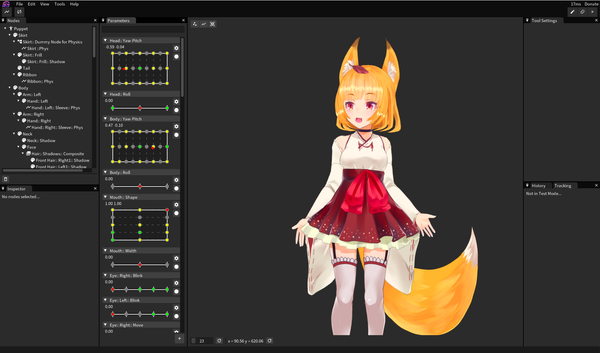
Inochi2D is a free, open-source rigging tool that aims to be an alternative to Live2D Cubism. It includes Inochi Creator (for rigging) and Inochi Session (for live performance with built-in face tracking), so it can technically replace both Live2D and VTube Studio in a single free package.
Current state: Inochi2D is still in active development and has made progress since its launch, but it's not yet at the level of Live2D Cubism in terms of features, stability, or documentation. The community is active on Discord and GitHub, and the project receives regular updates.
Who it's for: Creators who want a completely free pipeline and are comfortable with beta software. If budget is your primary concern and you don't mind some rough edges, Inochi2D is worth trying. If you need reliable, polished tools for a production stream, Live2D Cubism + VTube Studio is the safer path.
Pricing: Free and open-source.
Platforms: Windows, macOS, and Linux.
3D VTuber Software
VRoid Studio — Best Free 3D Avatar Creator
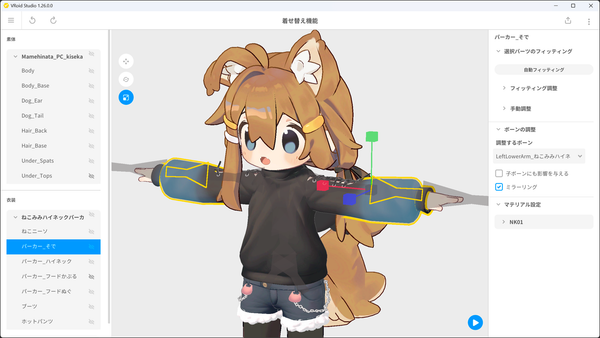
VRoid Studio is a free 3D character creation tool by Pixiv. It lets you build anime-style 3D avatars from scratch or customize sample models, then export them as VRM files — the standard format used by most 3D VTuber tracking apps.
What it does: VRoid Studio is specifically a creation tool. You sculpt hair, paint textures, adjust face and body proportions, dress your character in customizable clothing, and export the finished model. The exported VRM file then goes into a tracking app like VSeeFace or Live3D for live animation.
Why it stands out: The interface is surprisingly intuitive for 3D software. You can create a usable model in under an hour if you're working from the presets, or spend days refining a custom character. The hair tool is particularly well-designed — you draw hair strands directly onto the model and the software handles the 3D geometry. There's also a large community sharing free clothing, hairstyles, and textures on VRoid Hub.
Pricing: Completely free. No paid tiers, no watermarks, no restrictions.
Platforms: Windows and macOS (available on Steam).
Limitations: VRoid Studio produces anime-style models only — it's not built for realistic or non-humanoid characters. Complex models with lots of accessories can be performance-heavy. For non-anime styles or highly custom models, you'll need Blender (free but with a much steeper learning curve).
VSeeFace — Best Free 3D Face Tracking
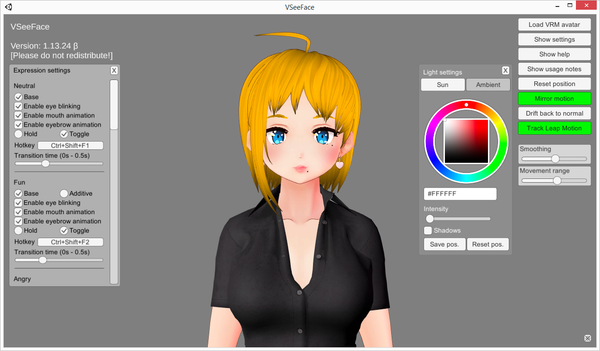
VSeeFace is a free face-tracking application for 3D VTuber avatars. It's the 3D equivalent of VTube Studio — you load a VRM model (created in VRoid Studio, Blender, or another 3D tool), and VSeeFace uses your webcam to track your face, eyes, and head movements in real time.
What it does: VSeeFace tracks facial expressions, eye movements (including gaze direction), and head rotation using a standard webcam. It supports VRM avatar format, making it compatible with models from VRoid Studio, Blender, and Unity. You can also connect mobile face-tracking apps like iFacialMocap or MeowFace for higher-quality tracking via your phone's camera.
What's changed: VSeeFace remains in beta in 2026, but it's been stable enough for daily streaming use for years. The developer continues to push updates, and the community has produced extensive documentation and troubleshooting guides. Hand tracking requires a Leap Motion controller — unlike VTube Studio's recent webcam-based hand tracking, VSeeFace hasn't added this feature yet.
Pricing: Free for non-commercial use.
Platforms: Windows only (64-bit). This is the biggest limitation — macOS and Linux users need to look elsewhere.
Limitations: Windows-only. Still technically in beta, though it's been reliable in practice. The interface is functional but not polished. No webcam-based hand tracking (requires Leap Motion hardware for hand movements).
Live3D — Best All-in-One 3D VTuber Tool
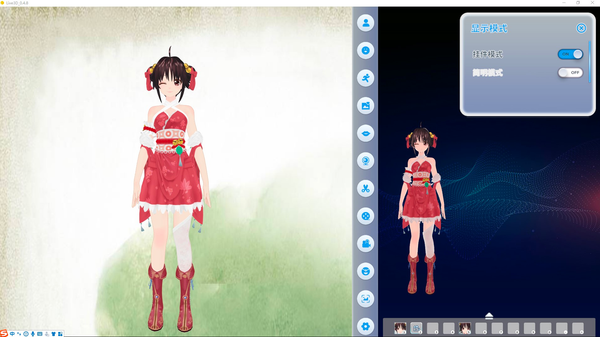
Live3D is a 3D VTuber platform that bundles avatar creation, face tracking, and streaming tools into a single application. If you want to avoid juggling multiple programs, Live3D is the closest thing to an all-in-one solution for 3D VTubing.
What it includes:
- VTuber Maker — Face tracking and live animation
- VTuber Editor — Avatar customization and creation
- VTuber Gallery — Library of pre-made avatars, backgrounds, and props
- Virtual Effects Twitch Extension — Interactive stream effects triggered by viewers
Pricing: The free version includes basic tracking and streaming features but limits the number of avatars, backgrounds, and poses available. The paid subscription starts at $3.90/month and unlocks the full library and all features. There's no one-time purchase option.
Platforms: Windows.
Limitations: The convenience of an all-in-one tool comes with trade-offs. Live3D's individual components (tracking, creation, etc.) aren't as refined as the dedicated tools — VSeeFace has better face tracking, VRoid Studio has a better character creator. The free version's limitations can feel restrictive. But if simplicity is your priority and you want one program instead of three, Live3D does the job.
Which Software Should You Use?
It depends on whether you want a 2D or 3D avatar, your budget, and how much setup time you're willing to invest.
If you want a 2D VTuber avatar:
- Fastest path: Buy or commission a pre-rigged Live2D model → download VTube Studio (free) → start streaming. Total cost: $0 for software + model cost (typically $50-500+ depending on complexity).
- DIY path: Draw your own art → rig it in Live2D Cubism (free tier or $54/year) → animate in VTube Studio (free or $14.99 for no watermark). Total cost: $0-69.
- Budget path: Use Inochi2D for rigging and tracking (free, but less polished). Total cost: $0.
If you want a 3D VTuber avatar:
- Recommended path: Create a model in VRoid Studio (free) → animate in VSeeFace (free). Total cost: $0. Windows only.
- All-in-one path: Use Live3D for everything (free tier or $3.90+/month). Less refined than dedicated tools but simpler to set up.
- Custom path: Build a model in Blender → import to VSeeFace or Live3D. Highest quality ceiling but requires significant 3D modeling skill.
If you're not sure yet:
Start with PNGtubing — it uses static images with simple animations instead of a tracked avatar. It's the easiest way to test the waters of avatar-based streaming before committing to full VTuber software. Check our PNGtuber guide for how to get started.
Frequently Asked Questions
What is the best free VTuber software?
For 2D: VTube Studio (free with watermark) paired with Live2D Cubism (free tier). For 3D: VRoid Studio + VSeeFace — both completely free. You can start VTubing without spending anything on software.
Do I need a special camera or equipment?
A standard webcam works for basic face tracking in both VTube Studio and VSeeFace. For better tracking quality, an iPhone with Face ID provides significantly more precise data — VTube Studio's iOS app can wirelessly connect to the desktop version as a tracking camera. You don't need a Leap Motion controller unless you want hand tracking in VSeeFace specifically.
Can I use VTube Studio with a 3D model?
No. VTube Studio only supports 2D models rigged in Live2D format. For 3D VRM models, use VSeeFace or Live3D.
How much does it cost to become a VTuber?
Software alone: $0-69/year depending on your choices. The main cost is the avatar itself. A commissioned 2D Live2D model typically runs $100-800+ depending on complexity and artist rates. Pre-made models (like our Customizable VTuber Model) are a more affordable option. 3D models built in VRoid Studio cost nothing but your time. For more on the full process, see our guide to becoming a VTuber.
What's the difference between VTubing and PNGtubing?
VTubing uses real-time face tracking to animate a rigged model — your avatar's mouth moves when you talk, eyes blink, head turns. PNGtubing uses simple static images (usually two: mouth open and mouth closed) that swap based on microphone input. PNGtubing is much simpler to set up but less expressive. Many creators start as PNGtubers and upgrade to full VTubing later.


